Open Content → Post Views → AI Posts to review your brand’s generated content and access the creation tools.
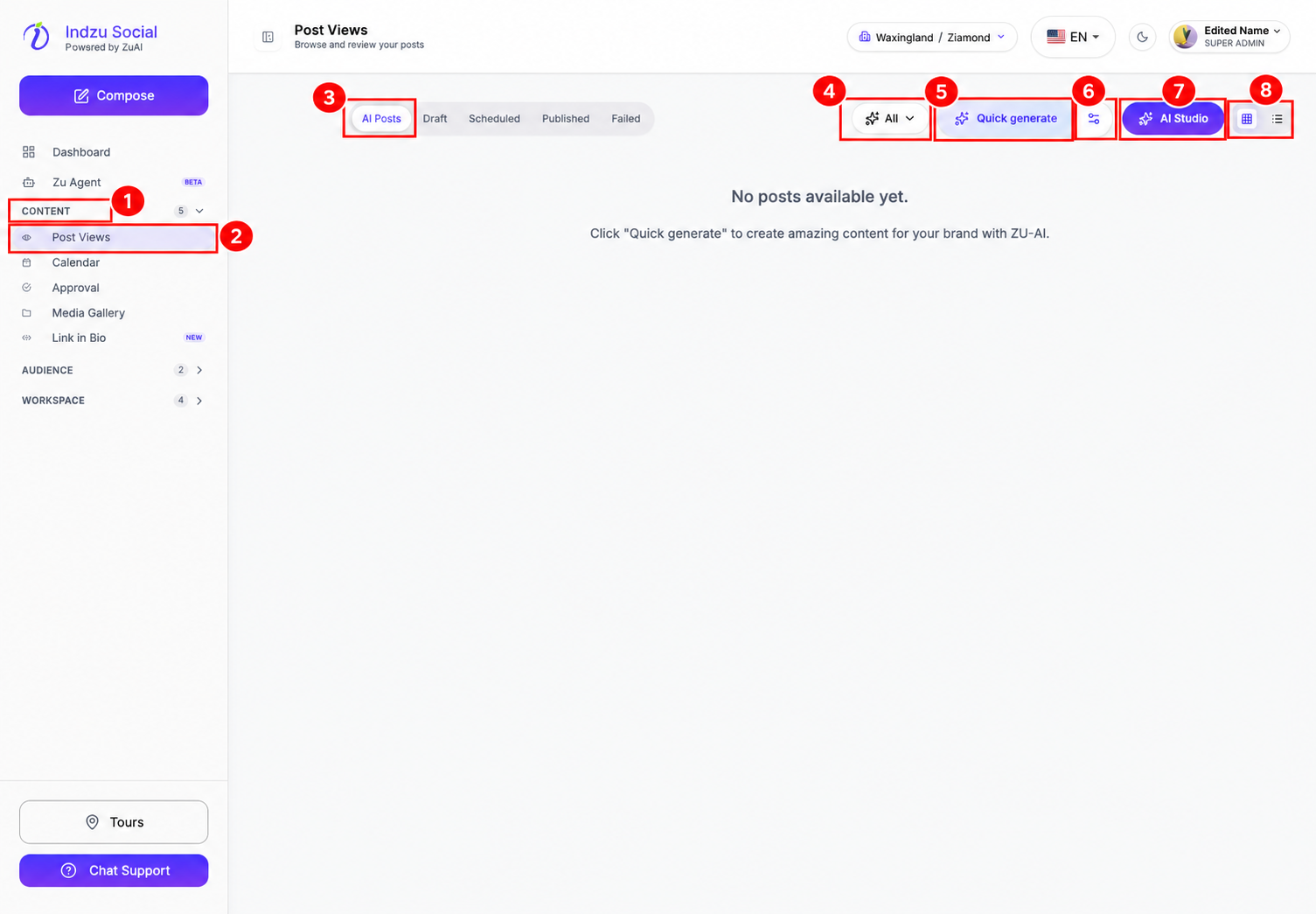
Page controls
- All dropdown: show all generated content, images only, or videos only.
- Quick generate: review your saved generation choices, then start generation.
- Settings icon beside Quick generate: adjust the output shape, post count, post mix, logo, instructions, and reference-image settings.
- AI Studio: choose a dedicated image or video workflow.
- Grid/list toggle: choose how to browse generated items.
When generated content is available
Generated items provide their available previews, caption/content details, and actions such as downloading, deleting, or creating a social post. Actions depend on the content’s readiness and your permissions. Review captions and media for accuracy before scheduling.
To schedule several ready items together, select their checkboxes and choose Add to Queue. You need connected channels and a saved posting queue with time slots. Scheduled social posts can then be checked in the Scheduled tab or Content → Calendar.
An empty page is not an error: check the selected brand and media filter first.